Wednesday, July 27, 2011

Windows taskbar showing only one item per IE instance (not one per tab)

After I installed IE9 on Windows Server 2008, found that in Windows taskbar for Internet explorer are showed items for each open IE tab. If you are get used to showing only IE browser instances in Windows taskbar like me then you just found easy guide how to conifgure your IE to show only one item in Windows taskbar per instance.

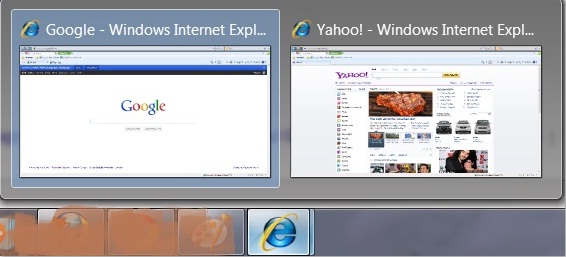
So, you have many tabs opened in Internet Explorer, and widnow taskbar display many previews, one for each opened tab. On image below, two instances of IE are opened, first instance have two opened tabs and another IE instance have one opened tab.

Windows taskbar preview for IE 9 with Show previews for individual tabs in taskbar option on


And you think it would be better if only one preview per instance of IE will be visible. In our example we want to have two previews (imagine what a mess will be if you have dozen of open tabs) for each IE instance one without tabs:

Windows taskbar preview for IE 9 without tabs


Solution:
  • Click the Tools option at the top right corner of your Internet Explorer browser window and then click on Internet Options

    Click the Tools option at the top right corner of your Internet Explorer browser window and then click on Internet Options


  • Internet Options --> General --> Tabs --> Settings

    In the Internet Options screen, under General tab, find Tabs category and click on the Settings button


  • uncheck option "show previews for individual tabs in the taskbar *", click OK and restart your Internet Explorer.
  • Tabbed browser settings


Now you configured your IE to show previews in Winodws taskbar only for each instance not for tabs.


Monday, July 25, 2011

jQuery picture zoom

How to make jQuery picture zoom effect in a simple way. This jQuery image zoom effect you can easy add to your web or maybe to blogger's post. On this blog you can find more useful jscript effect tutorials.

Let's first take a look how jQuery picture zoom look like:


So when visitor hover a mouse over small picture zoom portion of that image appeared on right side with help of jQuery. On mouseover, image is zoomed! I believe that this is one of the simplest implementation of picture zoom effect you can find on Internet.

To accomplish picture zoom with jQuery like in demo you need to add this code on your web page:


<script src="[PathToJqueryFile]" type="text/javascript"></script>

<script src="[PathTojqzoomFile]" type='text/javascript'></script>

<script type="text/javascript">

    $(function () {
        var options =
{
    zoomWidth: 275,
    zoomHeight: 275
}
        $(".jqzoom").jqzoom(options);

        var options2 =
{
    zoomWidth: 275,
    zoomHeight: 275,
    zoomType: 'reverse'
}

        $(".jqzoom2").jqzoom(options2);

    });
</script>
<!--JQZOOM-STOPS-HELP@-http://bloggerstop.net-->

<a href="[PathToBiggerImage]" class="jqzoom" style="" title="Paris">

  <img src="[PathToSmallerImage]"  title="kawasakigreen" style="border: 1px solid #666;"><br />
</a>


You can copy code above and replace green words with real values:

  • [PathToJqueryFile] - path to jquery-1.3.2.min.js file. You must have this file to implement any jQuery functionality on your web site. You can download this file here.

  • [PathTojqzoomFile] - path to jquery.jqzoom1.0.1.js file. This file is needed for zoom functionality. You can download this file here.

  • [PathToBiggerImage] - path to image that will be displayed as a zoomed part of picture (in example it is zoomed portion of image which appear on the right side of the screen)

  • [PathToSmallerImage] - path to image that will be displayed as a image that you can move cursor over it (in example this is left picture)


In the end, here is some real code that works but please use it just for testing purpose. If you want to implement jquery picture zoom fuctionallity on you page, please, do not use paths you find on demo code below but download jqury files and upload them somewhere.


<script src="http://jqueryjs.googlecode.com/files/jquery-1.3.2.min.js" type="text/javascript"></script>
<script src="http://nikofer.opendrive.com/files/54142960_wVVW5/jquery.jqzoom1.0.1.js" type='text/javascript'></script>

<script type="text/javascript">

    $(function () {
        var options =
{
    zoomWidth: 275,
    zoomHeight: 275
}
        $(".jqzoom").jqzoom(options);

        var options2 =
{
    zoomWidth: 275,
    zoomHeight: 275,
    zoomType: 'reverse'
}

        $(".jqzoom2").jqzoom(options2);

    });
</script>
<!--JQZOOM-STOPS-HELP@-http://bloggerstop.net-->

<a href="https://blogger.googleusercontent.com/img/b/R29vZ2xl/AVvXsEjS8KHDSFc9LUf7Z8GIo920lA6j_EjMvQOCvQcT5puVzZoH3-i_MYjha2w4Siej9wd2utJSwagutC5UHGDvYZcV2dgGq0kI8dn5GsF1PPpYakYosgenP59zW69JohD-Ai3e-Zws-w46YYE/s800/SealSmall.jpg" class="jqzoom" style="" title="Paris">

  <img src="https://blogger.googleusercontent.com/img/b/R29vZ2xl/AVvXsEh2KDEWmLwz2Mx5wo-3cBnjNn-4e_HPYx6xzeMAikXolzag2JN7SJcO21oMpe-R_k9pW_wIusC1YjgnrLHPn74FHrspa1DpeSs-QKgF4nKkRli8dMH7V-mxipLbY95SMVgcIeXqJng0Tnk/s144/SealBig2.JPG"  title="kawasakigreen" style="border: 1px solid #666;"><br />
</a>

Thursday, June 9, 2011

What Is Direct Email Marketing?

Direct Email marketing is when a company sends a profitable message to a group of people by the use of electronic email. The emails generally consist of advertisements, business requests or donation and sales solicitation. It is considered email marketing if it helps to build a company’s reputation, trust in a product and/or customer loyalty. A direct email marketing solution is believed to be an excellent and resourceful way of keeping in constant contact with clients and potential business associates while promoting your business at the same time.

Internet marketing - Image by renjith krishnan / FreeDigitalPhotos.net

An online marketing company can help businesses greatly benefit from this sort of advertising as it is enables you to reach out to your target audience without a huge amount of expense. Television advertisements, radio air play and leaflet drops are time-consuming and costly, not only that, there is the issue of not reaching a wide enough audience. A direct email marketing solution is worldwide and free. You can also tailor your email lists to meet several criteria’s such as customer’s likes and dislikes, spending habits and how long certain addresses have been on the list. Emails are created and sent out to specific members of your email list personalised to provide the information they have requested or are interested in. This not only increases your sales but also makes your customers value you.

There are a few different ways of developing an email marketing campaign. An online marketing company would advise you to start off by sending a welcome email to thank the new client for expressing interest in your company. Welcome letters notify the public about the company and help to give you information about the customer so that they can be put into the correct categories for the specific information they need.

Other email campaigns can include special announcements on products or services, a monthly newsletter concerning your company and/or products, money off coupons for future purchases etc. each email you send out needs to have company information towards the bottom of the page, enabling potential clients to learn more about your company and to ‘opt-in’ to receiving any upcoming emails. An online marketing company may advise you to offer your clients an incentive program by giving out a ‘promo’ code so that they can collect discounts on future purchases. This is a simple way of monitoring the worth of your campaign as well as what your contacts are interested in.

With the additional help of marketing software, a direct email marketing solution is a fantastic way of reaching your target markets but also staying connected to your purchasing base. When used efficiently, this form of marketing can keep hold of older clients and get new ones as satisfied customers will recommend your services to their friends and family and it could not be simpler, with the touch of a button you can forward an email. Your profit on investment is substantially higher than with the more traditional ways of marketing. With the help of an online marketing company to ensure these methods of advertising are correctly employed, your company will go from strength to strength.

This post was written by Crispin Jones on behalf of Boom Online Marketing. Crispin writes on marketing subjects including direct email marketing.


Tuesday, June 7, 2011

Why isn’t social media marketing working for you?

So you’ve got your blog in place, a Twitter account and your Facebook page created? Surely it’s time to sit back and wait for the money to roll in?

This may sound like a rather foolish plan of action, but it does rather typify the approach of many small businesses. It seems that there are plenty of small business owners who don’t really understand what social media marketing is all about.

This shouldn’t really come as a surprise. We’re talking about a subject here that has a considerable “buzz” surrounding it, but that level of hype often only adds to the confusion. It may be that plenty of business owners and marketing executives are aware that they should be doing something with social media. You may well be in the same position.

Do you need social media?

You could be forgiven for thinking that all of this hype suggests that there is no substance to the social media revolution. But you’d be wrong to dismiss the impact of this type of marketing.

Many businesses have embraced social marketing successfully. They’ve realised that a Facebook presence, for instance, can reduce their dependence upon other traffic drivers, such as search engines. This clearly offers a number of advantages.

If you’re tired of having to spend a significant amount of money optimizing your website and having to take your chances on Google, there’s certainly something to be said for reducing costs and reliance on this particular channel.

Although there are small business SEO providers around, there’s absolutely no doubt that good quality SEO companies are frequently too expensive for many small business owners to make use of their services.

Maximizing the impact of social media marketing

The important things to do if you want to be successful in your social media marketing approach are:

  • Sign up on the main social networks. These include Facebook and Twitter

  • Make sure that you post regularly. This ensures that potential clients know that you take social media seriously. Try to post daily on Twitter and update your blog at least twice a week.

  • Engage with your audience. Remember that you’re not simply sending a message out there – you should be actively engaging in a two-way conversation. Always think about the target demographic.

  • Monitor the results. If you find that a particular channel is working really well for your business, then it makes sense to put more effort into that channel. You can use Google Analytics to monitor results.

If you know that social media could have a vital impact for your business, then how do you go about getting the returns that should be available to you?

It’s simply not enough to create a Facebook page and to expect that you’ll derive a significant income as a result. You need to engage with potential customers.

The best approach is to make sure that you regularly post to Facebook, Twitter and any other social media networks that you choose to use. Try to offer a “joined up” marketing approach, enabling potential clients to know that you use multiple channels.

This approach has a number of benefits. By reaching out in this way, you maximize your chances of exposure. But you’re doing a lot more too. You’re also allowing customers to see that you take online marketing and business successfully.

There’s an enormous amount of evidence to show that most of us like to buy from trusted brands. We often worry about using retailers and companies if we don’t know much about them. That’s why many organizations spend an enormous amount of money on increasing brand recognition.

This is particularly important when it comes to online marketing too. Think about your approach to social media as offering the world a window on your brand, your ethos and the services that you have to offer.

If you can create an interesting, dynamic, informative approach then there’s no reason why social marketing can’t help to transform your business.

Author Profile

Keith Barrett is an experienced search engine optimization expert and has been working in this area for more than a decade. His agency, Search South, currently offer Hampshire SEO services, as well as a full range of SEO packages.


Friday, June 3, 2011

5 SEO Tips for Blogs

Everyone wants to be recognized for the hard work they put into writing for their blog each day. However, is you blog getting the recognition it deserves? Are you easily found on Google? Here are 5 quick tips that can greatly improve your SEO, and readership, without much effort.

  1. 1. Blog Titles: Make sure that the (title) portion of your blog page has the title of the article contained therein. Meaning, your main blog page will naturally have a generic title, but does your comment page? Make sure your comment page ALWAYS includes the title of the particular article. You already have the code for the title in your blog section template, just copy and paste between your title tags. This could be the difference between being on page 1 or page 40 in Google.


  2. 2. Email Field: Every blog should have an Icon to subscribe to RSS feeds. Although, most people won’t subscribe until they know you, you should allow them an easy way to simply add their email address and press subscribe. Super simple and sends your new posts straight to their inbox. There are lots of websites to help you will this. I use Feedburner.com because it is free, and will also ping your blog automatically to other media sites.


  3. 3. Plug It: After you press submit, you should spend the next 10 minutes plugging your new post. There are several free sites out there to help you achieve instant search engine results. Technorati, Digg, Twitter, Buzzit.com are just a few of the networks that will get you onto Google almost instantly. Plus with all the link traffic and building your SEO, this is one of the biggest, and easiest ways to get your blog to the top.


  4. 4. Tell a Story and Respond to Comments: Engage your readers. They will want to “check in” with you everyday and see how things are going. Make them hang on to every word you write as you interestingly tell them about how you were just on a flight with Patrick Dempsey. (Which you might have been!) And when they comment, respond! Blogging is about making friends and relationships. Instant readership when you become a relatable friend.


  5. 5. Analytics: Pay attention to your blog stats. Which posts were popular? Which posts didn’t work as well? When you focus on what your readers want to hear, incorporate those search terms into your posts and link them to past articles you have written.

These are simple tips, so there is no reason not to implement these tools and watch your blog increase SEO and readership. What is your favorite SEO tip for your blog? Leave it in the comments!

Caitlin is currently a writer for Amazing News, which is a website updated daily with heartwarming and cheerful news stories. Caitlin graduated from the University of Kansas with a journalism degree specializing in advertising and marketing.