This blog have blog tutorial, Javascript and HTML tips (including jQuery). Intention of this blog is to help readers and explain things in simple manner. This also include articles about web traffic and SEO (Search engine optimization).
After a a while I wanted to write new blog post with snippet of SQL code. After googled "add code snippet to blogger" search terms at the of the results a link to the hilite web was found.
It is a very easy to use web. I recommend.
It can be used for various programming languages.
The user only needs to:
Type source code
Choose Language, Style and Line numbers
Click the Higlight button, Preview will appear the and the user only needs to copy and paste HTML code from HTML textbox into blogger post (in HTML view)
Ok, using Google Anlytics make a easy to find how many pageviews get your web site or specific web page.
But what if you want to know how many visitors get specific group of pages. For example you want to track only pages written in 2013 or just pages written by specific author or only pages about specific topic...
This article is a guide how to make report for specific group of individually picked pages from your web site.
To better explain how to make reports of specific pages in GA we will explain:
How to report only on specifically picked pages
How to report pages written in 2012 instantly
How to make customized report for year 2012
Track visits from all pages about some topic in GA
Maybe you want to know how many visits coming from some specific topic. For example how many visits drive topics about javacript.
If it is the case you can easily get report in Google Analytics with the number of visits for all pages on your site which include keyword javascript in title. Just follow instructions.
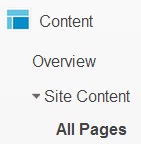
In Google Analytics click on Content --> Overview --> Site Content --> All Pages
Find and click link "advanced" next to the search bar
new container will appear, in third button choose Containing and in empty textbox type desired term. For purpose of this example it is "javascript".
click on "Apply" and you will get report for all pages on your site or blog which have term "javascript" in title
Track specifically picked pages on your site instantly in GA
Let's say I want to make a report for group of only two pages on my blog and those two pages are: http://interestingwebs.blogspot.com//2009/01/jscript-in-blogger-post.html and http://interestingwebs.blogspot.com//2009/06/javascript-in-external-file.html.
In Google Aalytics click on Content --> Overview --> Site Content --> All Pages
Find and click advanced near search bar
new container will appear, in third button choose Matching RegExp and in empty textbox type second part of URL of page you want to track. We want to track two pages so we can use or operator : |.
In our example it would be: "2009/01/jscript-in-blogger-post.html|2009/06/javascript-in-external-file.html".
click on "Apply" and you will get report for only two specific pages
Get visits report for all pages written in selected year with Google Analytics
It can be useful to find how many visit drive all pages on your site written in one year. For example I want to know how many visits get my pages written in 2012 for last month.
This can be done with Google Analytics but only if the year in URL of your individual pages. I use blogspot blog and year can be read from URL.
From this URL we can conclude article is written in year 2013 and in second (2) month (February).
So, if permalinks on your site are structured in similar way you can use this method to make reports based on year when article is published.
In Google Aalytics click on Content --> Overview --> Site Content --> All Pages
Find and click advanced near search bar
new container will appear, in third button choose Containing and in empty textbox type year in this case 2012.
click on "Apply" and you will get report only for two specific pages
Make custom report for posts written in selected year whch can be reused
Now you know how to group pages by specific criteria and make a reports for them. But it have no sense to every time you need such a report you must to create it from scratch. To avoid this you can make custom report which can be used later.
So here is example which will help you to learn some basic steps for creating custom reports. This example learn you how to create and use custom report which will report number of Pageviews for all pages written in 2012 year.
Find and click "Customization" in Google Analytics
click "New Custom Report"
in "General information" enter title, for example "2012 pages"
in Report content choose Name, Metric Groups and Dimension Drilldowns. For this example for Name type "2012 pages", for Metric Group choose Pageviews, for Dimension Drilldowns choose Pages.
in Filter tab set first button to "Include", second button to "Page"
, third button to "Regex" and fourth Textbox to 2012
Save custom report and now you can see your Custom Report by clicking Custom Report --> 2012 pages
Here you will find a few links to blogger tips for beginners. Those are tips that every blogger should know.
Tips are primarily for blogspot blog. Learn few basic techniques which will help you to blog better.
Learn how to make and arrange categories in blogger, how to have recent posts in your side bar, expandable summaries, display HTML code in blogger post...
Add search capability on your blog with AdSense for Search. Allow your visitors to search content of your site in a Google like manner and try to earn some money.
How to add unique meta description tag to each post post in blogspot (blogger) blog?
If you searching answer on that question this article is right place to find solution. It give simple easy to implement solution.
This article is divided on two parts:
what is purpose of meta description tags
how to implement meta description tags to every post in blogger
WHY TO USE META DESCRIPTION TAGS?
What is Meta Description Tags?
Meta Description Tags are HTML elements used to provide description about a HTML page.
Why Meta Description Tags are important?
It is important because Meta Description Tag content might be used in Search Engine Result Page (SERP) for snippets. So if user find snippet text usable there is better chance he will open your page.
Example of SERP code snippet
We get above code snippet and here is a content of Meta Description tag!
<meta content='This blog have blog tutorial, Javascript and HTML tips (including jQuery).'
 name='description'/>
ADD DIFFERENT META DESCRIPTION TAG TO EVERY POST IN YOUR BLOGGER BLOG
Now blogger make it easy to add meta descriptions for each post throug blogspot interface.
Recently it was much harder to accomplish it, you must make a change inside HTML template edit for each post and it was very impractical.
Under Meta tags switch "Enable search description" (to Yes) and type text you want to be meta description for your blog. Of course don't forget to Save changes.
Last step is to inside "Edit post interface" find Post settings --> Search Description and type description you want to appear for meta description tag in current post.
Here are some basic guidelines for submitting guest post on this blog.
First let's list few reasons why you should guest post:
by posting on other’s blog, you are gaining exposure and publicity
get more backlinks
immediately increase traffic if you guest post on popular blogs
Rules for guest posting on this blog
Choose a topic
suggest a few titles with two or three keywords - e.g. Title: "How to increase web traffic" Keywords: "increase traffic"
I will decide if I am satisfied with suggested titles, topic and keywords, optionally you can make keyword research
you can send me your suggestion on this mail with a subject "Guest post"
Choose a topic which is related with this blog. Topics could be:
HTML, CSS...
javascript, jQuery
tips for blogspot blog
tips for general blogging
how to increase web traffic, monetization and SEO
guest post should have some useful information, answer on some question or give some step by step instructions how to do something, for example: Adding categories to blogspot (blogger)
Post rules
article must be original, it shouldn't be published anywhere on web
use paragraph tags (<p></p>)
paragraphs should not be too long, so text should be easy to read
If you have some screenshots you could send me images in mail (not more then 3 per post) and type image file name inside text where image should be. .jpg format is recommended.
Example of well formated text
At the end here is HTML for this post. When you send me guest post it should be formated similar to this example:
<p>Here are some basic guidelines for submitting guest post on this blog.</p>
<p>First let's list few reasons why you should guest post:
<ul><li>by posting on other%u2019s blog, you are gaining exposure and publicity</li>
<br />
<li>get more backlinks</li>
<br />
<li>immediately increase traffic if you guest post on popular blogs</li>
</ul></p>
<br /><br />
<h3>Rules for guest posting on this blog</h3>
<h4>Choose a topic</h4>
<ul>
<li>suggest a few titles with two or three keywords - e.g. Title: "How to increse web traffic" Keywords: "increase traffic"
<br /><br />
<ul><li>I will decide if I am satisfied with suggested titles, topic and keywords, optionally you can make <a href="http://interestingwebs.blogspot.com/2011/11/how-to-keyword-research.html">keyword research</a></li>
<br />
<li>you can send me your suggestion on this <a href="mailto:blogsrec@gmail.com?subject=Guest post">mail</a> with a subject "Guest post"</li>
</ul>
</li>
<br /><br />
<li>Choose a topic which is related with this blog. Topics could be:
<ul><br />
<li>HTML, CSS...</li>
<br />
<li>javascript, jQuery</li>
<br />
<li>tips for blogspot blog</li>
<br />
<li>tips for general blogging</li>
<br />
<li>how to increase web traffic, monetization and SEO</li>
</ul>
</li>
<br />
<li>guest post should have some useful information, answer on some question or give some step by step instructions how to do something, for example: <a href="">Adding categories to blogspot (blogger)</a> </li>
</ul>
<br />
<b>Post rules</b>
<ul><li>article must be original, it <b>shouldn't be published anywhere on web</b></li>
<br />
<li>use paragraph tags (<p></p>)</li>
<br />
<li>paragraphs should not be too long, so text should be easy to read</li>
<br />
<li>you shuold pay attention on <a href="http://interestingwebs.blogspot.com/2011/12/web-page-optimization-techniques.html">keywords in text</a>:
<br /> <br />
<ul><li>Keyword position on web page</li>
<br />
<li>Keyword density</li>
<br />
<li>Keyword proximity</li>
</ul></li>
<br />
<li>using unordered list is a good idea, example:
<br />
<ul>
<br />
<li>first line</li>
<br />
<li>second line</li>
<br />
</ul></li>
</ul>
<br />
<b>Writing code inside guest post</b>
<ul>
<li>if you want to have some code in guest post put it inside <pre> tags for example: <pre>Some code</pre></li>
<br />
<li>don't forget to replace code characters and symbols into character entities, find more in <a href="http://interestingwebs.blogspot.com/2008/12/easy-way-to-put-code-snippets-in-blog.html">How to display HTML code in blog or web</a></li>
</ul>
Learn how to make keyword research - choosing the right keywords for your article could be a key for making top ranking article. Follow the link and learn what free keyword research tools exists on the web and how to use them.
Basic web page optimization techinques - a short tutorial about most essential things you should know when optimize you web page for increasing web traffic such as: title tags, URL keyword optimization, keyword position on web page, keyword density, keyword proximity...
How to analyze and improve bounce rate - Bounce rate is the percentage of visitors who entered the site on a page and left right away. Bounce rate should be lower as possible. Learn how to measure, track and improve bounce rate.
Increase blogger traffic change title - Here is simple procedure which help me to significantly increase blogger traffic which can be applied for other types of web sites too.
Purpose of this article is to give readers a short list and brief explanation of most useful articles (I found recently) with tips how to blog and make more visitors and money. Article will be separated on few separate topics about blogging I learned recently. This is first article in a series. Expect more article like this for a month or two...
In this article you can learn about :
Google page layout algorithm - page layout (specially above the fold area) have influence on how Google rank page
how AdSense unit inside post below title increase ad clicks and how to do it in blogger
guide for optimizing Google+ profile, facebook page, twitter profile...
how to get more web traffic
Domain name change impact on seach engine ranking...
Google page layout algorithm - page layout (specially above the fold area) have influence on how Google rank page
Recently on January 19 2012 Google make new algorithmic change. This change penalize bloggers who have lot of ads in above the fold area which push content down. I learned about this change from kezanari blog.
One of adviced tools to test does your site is affected by Google page layout algorithm is Browsersize.
How AdSense unit inside post below title increase ad clicks and how to do it in blogger
To avoid "Google page layout algorithm" I replaced AdSense units from under the post area to in the post area below the title. This change increase my AdSense revenure per visit (CTR - click through rate). To find more how to place AdSense ad unit inisde post below the title and how it affect AdSense revenue read : How to add adsense below post title.
Guide for optimizing Google+ profile, facebook page, twitter profile...
How to get more web traffic is an excellent in depth article with a lot of tips and tricks for increasing web traffic. The writer of this article is Ana Hoffman and she have excellent blog about blogging and making money online. She earn money from her blog, visit her make money report on december 2011 to see how successful is she.
Domain name change impact on search engine ranking
If you thinking about domain name change read article Domain name change and find practical impact of domain name change on authors experience with lots of informations about this topic.
Recently I add AdSense ad below post title on my blogger blog and result of my action is significant growth in CTR (Click Through Rate). Higher CTR usually leads to higher revenue.
In this article I will try to answer on next questions
why bloggers should place adsense ads inside post
does AdSense ads directly below title inside Blogger posts are permitted and what to do?
How to add AdSense ad below post title in each Blogger post
Why bloggers should add AdSense ad below post?
Answer is simple, AdSense ads placed below post title have higher CTR value. This position is one of best performing for earning money. Check the image of Google heat map for ideal ads placing. Dark orange is for strongest performance to light yellow for weakest performance.
Since Page layout algorithm change, it is no longer advisable to place large block of AdSense ads above posts. "Page layout algorithm" cause Google penalty for blogs where relevant content is pushed down by large blocks of ads. In this circumstances placing one AdSense below post title right to post content text is a very good solution.
In three weeks after adding AdSense below post my CTR grow from 0.26% to 0.42%. To learn more about CTR trends and AdSense combinations on my blog visit : Increase blog adsense revenue real case scenario.
Does adding AdSense below title in post is allowed?
Using blogger interface you can easily add AdSense ads under post, between the posts or in the sidebar. But to add AdSense ads inside post below post title you should make change directly in blogger template, there is no simple way to do it. Step by step guide how to place AdSense ads below the post title you can find in next section of this article.
The question is does inserting Googe AdSense ads inside post below the title is permitted by Google term of services? Does this method break the rules?
Google forbidden placing misleading labels above Google ad units. So, if the AdSense ad unit directly below post title in some cases it could misleading visitors it is image connected with a title.
It is good practice to add a label above AdSense ad, something like "Sponsored Links" or "Advertisements". With this approach visitor will not be misguided. Take a look at image below how I add a label above the adsense unit below post title.
Personally I started to use this method since 2012-02-12 and AdSense ad unit work properly without a penalty. Here is the link to AdSense page where Ad placement inside article is suggested. Here you can find more about AdSense placement policies.
How to add AdSense ad unit below post title on blogger
Here is short tutorial:
First go to your Google AdSense account and copy AdSense unit code you want to implement inside your post
go to Postable (or some similar site) paste AdSense code, click button "Make it friendly" and copy encoded AdSense code
sign in to your blogger account and go to Layout --> Edit HTML
it is recommended to backup template on your local hard disk before doing any change in edit template box
check Expand Widget Templates checkbox
now inside Edit Template textbox find:
<data:post.body/>
just above <data:post.body/> tag paste the encoded adsense code
click button Save Template and you have AdSense unit just below post title in each post on your blogspot blog
if you want to add AdSense ad unit on the right side of your post below post title try with this code (this code should be placed above <data:post.body/> tag):
<div style='float: right;'>

PUT HERE ENCODED ADSENSE CODE

</div>
New year 2012 is come. It is time to evaluate how my blog is doing in 2011 and to think about actions for improving blog results in next year. In first part of this article I will show some blog statistics in last year and in second part there will be a list of planning blog activity I intend to do in new year.
How successful was 2011
To better describe 2011 year there will be shown:
number of visits per year
AdSense blog earning per year
traffic source overview
a few words about guest posting
Number of visits per year and next year expectation
In the image below is showed number of visits in 2010 and in 2011 year. There is growth of 79 percent for 2010 to 2011 or 42260 new visits. I am satisfied with this result and hope that on the end of 2012 I will get at least 42260 more visit (in this case sum will be 138.876). Or even better if growth will be 79% in 2012 I would have 172.227 visits.
AdSense blog earning per year
AdSense earnings in 2010: 11,49$
AdSense earnings in 2011: 112,61$
My AdSense earning raise much more than traffic. While traffic increased about 2 times, AdSense earning raise 10 times. Why?
My main traffic source is Google 89%, and 10% my blog get from direct traffic. In my opinion it is good to get lot traffic from search engines but I believe that my blog can get much more traffic from referring sites and I intend to work on it this year.
Guest posting
In this year my blog reached PageRank 3 for two months and fall again on PageRank 2. In that period I used myblogguest service and get more than 30 guest posts. Unfortunately those guest article bring me very little traffic. In my opinion those guest posts are not bad but are written without proper keyword research and on page optimization techniques.
improve blog structure - plan to make a few main sections pages which will lead to content pages of some topic (section). Something similar to Javascript effects tutorial. Links to those main section pages will be on main page of my blog
improve monetization of my blog - plan to try with buysellads.com service. Unfortunately they do not accept blogspot subdomain so I will think about changing domain name
prepare exact instructions for guest posting on my blog and put a visible offer for guest posting on my blog
try to buy articles with earned money using a site www.freelancer.com
publish some guest posts on A blogs. This is great way to reach audience.
Web page optimization is a very important thing if you want to have visited web page. How to do it? There are different techniques but in this article we will concentrate on on-page SEO optimization.
To make successful web page optimization you need to:
The most important HTML tag for Search Engine Optimization. It is very advisable to put your keywords inside title tags. Google search engine crawlers use these title tags as the main source for determining the page topic.
Text inside title tags will be showed in Google search engine result page too. On image below you can see how Google show title in result page for title: "Adding categories to blogspot (blogger) : Useful and interesting web sites". Words from search query are bolded.
Sample for title tag:
<title>Adding categories to blogspot (blogger) : Useful and interesting web sites</title>
Keyword on the beginning of the title have more weight than keywords on the end of the title. Blogspot users can find very good advice in article: Optimize blog - change title.
URL keyword optimization
Keywords in URL have important impact on your Google SERP (Search Engine Result Page) position. To prove this statement let's try type search term "Web page optimization" in Google. First five URL's in Google SERP are:
www.websiteoptimization.com/services/analyze/
www.websiteoptimization.com/
www.google.com/websiteoptimizer
en.wikipedia.org/wiki/Search_engine_optimization
www.webpagetest.org/
Tips for good optimized URL:
URL shouldn't be too long
Keywords on the beginning of URL have stronger effect than keywords on the end of URL (for example www.websiteoptimization.com/ is better than www.web-source.net/webpage_optimizing.htm). For
use hyphens as keyword separators in URLs. Blogger (Google's blog engine) use hyphens as separator for URL of particular posts.
Keyword position on web page
Keyword position also known as keyword prominence say :
The closer a word is to the front of the text area, the more relevant or important it is.
So put important keywords on the beginning of the page. Good practice is to use paragraphs in your web page. Use <p> and </p> tags to enclose text in paragraphs and put important keyword at start of paragraphs.
Keyword prominence rule is also valid for titles, URL's, headlines...
Keyword density
Keyword density is ratio between number of time keywords appear in page and total number of words on web page. Recommended keyword density is 2% to 8% by some authors, but it vary depending of source. Be careful too high density can trigger a spam penalty from Google. To find a keyword density for specific page check Page Analyzer.
Keyword proximity
Keyword proximity refers to how close the keywords that make up keyphrase are to each other.
To better explain there is an example:
A. Web page optimization techniques
B. Optimize your web page with best practice techniques
The A keyword phrase will make better Google result ranking for search query like "page optimization" as the relevant words appear next to one another and in the correct order. On the other side keyword phrase B will get better result for "Optimize web page".
Advice is to keep keywords together as a unit. When this is not possible, try to keep keywords not too far away from each other.
Optimization and body elements
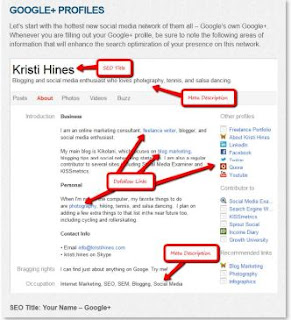
Heading tag (<h1></h1>)- typically opinion is to be twice as important in weighting terms as regular body text (source Get to the Top on Google). However recent data from SEOMOZ study has shown that it has a very low correlation with rankings.
Image alt Attribute - it have significant impact on keyword web page optimization. So use keywords in alt attribute to describe images on your web page.
Bold and italic tags - it is good practice to use bold and italic tags on your keywords. By SEOMoz bold tag have a minor amount of SEO weight while italic tag have slightly more SEO weight.
How to research keywords for your new blog article or web page? For example you decide to publish article and want to find best keywords combination and want to be on top of Google search results. It is not easy! Read this post, use proposed "How to keyword research" method and you will find how to increase probability to find best keywords combination.
How to make keyword research?
Answer on question: "how to make keyword research" is by using KEI and KOI. Let's start with KEI.
Keyword Effectiveness Index (KEI) - helps point out which keywords are the most effective and valuable. The KEI compares the number of monthly searches for a keyword with the number of search results and help to find the most effective keywords.
To find KEI use KEI formula:
KEI = (Number of Monthly Keyword Searches)^2 / (Competing Pages)
Number of Monthly Keyword Searches - this indicator you can find using Google AdWords Keyword Tool.
Competing Pages - find using Google search. Just enter your search term and check number of results.
To make things more clear take a look at this example:
we want to make keyword research on this keyword combination: "google keyword research"
on Google AdWords Keyword Tool page we can determine the number of global monthly searches for specific term, for keywords term "google keyword research" it is 9,900 searches per month
to find out raw google competition for specific keywords term we use Google search. For "google keyword research" there are 15,200,000 results.
now we can calculate KEI
KEI = 9,900 ^ 2 / 15,200,000
KEI = 6,49
higher KEI better keywords combination. With KEI we try to find keywords which are highly searched but in the same time are not overused on web
There is one more indicator similar to KEI - Keyword Opportunity Index (KOI). KOI compares the number of monthly searches for a keyword with the number of directly competing search results.
Example for calculating KOI for keywords term "google keyword research":
monthly searches for keywords term "google keyword research" is 9,900
number of directly competing pages can be found by using Google operator "allinanchor:". This Google operator return results containing query terms specified in the anchor text on links to the page.
number of directly competing pages for "google keyword research" is 9,740,000.
KOI is:
KOI = 9,900 ^ 2 / 9,740,000
KOI = 10,06
When you ask yourself how to do keyword research, it is good practice to find various keywords combination (thesaurus synonyms can help) find KEI and KOI for each of them and compare. Keywords combination with highest KEI or KOI is best choice. KEI method doesn't measure quality of competition just quantity (number of search results). To get quality in calculate, you can use SeoQuake, it show Google Page Rank for each result. So, if first few results have high PageRank, quality of competition is high.
There are many great online tools which can help you to build a better blog or web site. Some exists as web pages and some are various add-ons. Here you will find a list of best free online tools (in my opinion) for better blog.
Find blog visitor statistics
To improve your blog you must learn on your own success and mistakes. To do so, you need to know how well your blog or site is doing, you must track traffic and visits.
Two best web tools for tracking website visits are:
Statcounter - very simple web tool for tracking number of pageviews and visits to your site. The main advantage of Statcounter is its simplicity and it is ideal for begginers. Using statcounter you can also track:
Popular pages
Entry pages
Exit pages
Keyword analysis...
If you are using free version you can get detailed data only for last 24 hours. For basic tracking Statcounter is enough.
Google analytics - while Statcounter is easy to use, Google Analyitics (GA) is extremely powerful. Here I will not list what GA can do, it can do almost everything, it have many features and reports. What to say, GA is a king, long live to Google Analytics!
Estimate traffic of other sites
One way to estimate other web sites traffic and strength is through Google Page Rank and Alexa. Google Page Rank can vary from 0 to 10, 0 is worst while 10 is best. For Alexa on the other hand, rule is lesser is better, smaller number more visits. My blog in this moment have 217,000 Alexa value and 9,500 visits per month. So if some web site have Alexa rank lesser than 217,000 I can presume that this site has more than 9,500 visits per month.
SeoQuake - this add-on have one great feature. User can see Google PageRank value in Google result page. This can be very helpful when you try to find keywords for new blog article.
SEOQuake have more features like Keyword density, nofollow indicator, URL comparer...
Builtwith - with this service you can learn all sorts of useful informations about site you enetered into the search bar. Find out which blogging platform is used, what type of adverts are on site (like AdSense, Amazon...), how traffic is tracked, what javascript libraries are used, what widgets are on site and informations about aggregate functionality.
Online tools for choosing right keywords
Choosing right keywords for blog posts is essential for good Google Search Engine Result Page (SERP). It is important to choose wisely, keywords with low competition and, in the same time, keywords which people looking for (high number of searches).
Google - is an excellent tool to find how many web pages for specific keywords exists out there on Internet. You just need to type keywords in Google search bar, make a search and check the number of results below the Google search bar.
On the picture above you can see that for keyword search term online tools for blogger exists 36,000,000 search results.
You can use allinanchor Google search operator which return results containing query terms specified in the anchor text on links to the page. Some people think number of results with allinanchor is a more quality measuring unit for SEO then number of results gained with common Google query.
Google Adwords Keyword Tool - with this tool you can find number of Google monthly searches for specific keywords. This tool also, will suggest keyword ideas.
Guest blogging tools
If you want to publish guest posts on your blog first you must find guest post and second, verify if guest post is a duplicate.
My blog guest is a web community of guest bloggers. This site have article gallery where you can find and read guest post previews sorted by category. You can offer to publish chosen guest posts on your blog and if guest poster agree, you will get whole guest post article. In my experience to get guest posts on this site it is advisable your blog have Page Rank 3 or higher. My blog has PageRank 3 for some time. During that time I managed to publish 30 guest posts in less than 3 months. But when my PageRank fall to 2, guest posters lost interest for my blog.
Duplichecker is a free online plagiarism detection tool. You can copy and paste text you want to check or you can choose a text file to check for duplicates.
CopyScape plagiarism checker which search for copies of selected page on the web. You enter url of some web page click Go button and get duplicate of entered web page.
Online tools for better article writing
There are some online tools that can help you to write better articles. Online tools like tool which can help you to find synonyms which are better choice in keyword terms then your first keyword, spelling checker or help with putting HTML code in blog post.
Thesaurus - with this tool you can quick find definition and synonyms. Synonyms can help you in process of keyword optimizing. For example you want to use word help and deduce word "help" is to competitive in Google search results. Then you enter word "help" in Thesaurus and find that one of the synonym is word advice which is less Google competitive then "help".
English spell checker for Firefox - Firefox automatically checks the spelling of words entered in any text boxes containing more than one line. As soon as word typing is finished, it is checked and if the word is not in the dictionary, word is underlined in red color.
Postable - if you want to insert some HTML tags (like <p></p>) literally in your post you need to encode this text. Postable encodes HTML tags and when HTML tags are encoded you can insert encoded tags in blog posts and HTML will be showed literally in post. More about this topic in How to display HTML code in blog post
Blog appearance can be important. To improve graphic appearance of your blog or web site you can use various online graphic generators.
Cool Text - this is free online graphic generator for logo style and button design. With this web application you can easily generate styled text for menus, sidebars and buttons.
Tools for find free images
Finding the right picture to your blog article might be important. But many images are non-free for use so be careful. Where to find free images to insert in your new blog article? There are the list of few sites with free to search for free image collections.
Free digital photos - on this site you will find quality free images in small format (like 400 X 266 pixels). To publish free images you need to place a text hyperlink to the image creator's portfolio on FreeDigitalPhotos.net. This link must appear on the same page as the image.
Wpclipart - public domain (PD) pictures, no attribution or linking is required.
Where to upload files
Upload additional files for bloggers - in this article you will find list of free hosting services where you can upload additional files such as jscript files, css files, image files ect.
How to find does blog have dofollow comments or nofollow comments? This article will teach you how to difference dofllow links from nofollow links.
In this short guide you will find:
what is DoFollow and NoFollow
recognize DoFollow in Google Chrome
find DoFollow links with Internet Explorer
know which link are DoFollow in Firefox
easiest and best way to make difference between DoFollow and NoFollow links with NoDoFollow add-on
DoFollow and NoFollow difference
NoFollow
NoFollow is an HTML attribute value used to instruct some search engines (like Google) that a hyperlink should not influence the link target's ranking in the search engine's index. Search engine spiders will NOT crawl NoFollow link.
If link is Nofollow then link will not receive any vote and Google Page ranking will stay the same. To learn more about Pagerank visit Google PageRank simple tutorial.
Example NoFollow link:
<a href="http://interestingwebs.blogspot.com/2011/09/high-pr-dofollow-backlins-blogs-list.html" rel="nofollow">DoFollow blog list</a>
DoFollow
DoFollow links will be crawled by search engines and will get PageRank value (so called Google juice) from site.
Example of DoFollow link:
<a href="http://interestingwebs.blogspot.com/2011/09/high-pr-dofollow-backlins-blogs-list.html" >DoFollow blog list</a>
How to know does link is DoFollow on Google Chrome
Find hyperlink on web page
highligh hyperlink
click right mouse button and choose Inspect element
Inspect element box will be opened in which you will see HTML code of link, if it have rel="nofollow" then it is nofollow link, it doesn't it is DoFollow link
in Developer tools click on "Select element by Click", click on link and look in developer tools HTML code for selected link. If in HTML code exists rel="nofollow" then it is nofollow link, if it doesn't exists it is DoFollow link
Determine DoFollow links in Firefox
Find link on web page, highlight link, right click on mouse and choose "View Selection source"
inspect select source HTML code, if in HTML code exists rel="nofollow" then it is NoFollow link, if it doesn't exists we have DoFollow link







 ). However recent data from SEOMOZ study has shown that it has a very low correlation with rankings.


 Posts
Posts


