Showing posts with label SEO. Show all posts

Monday, September 3, 2012

Increase website traffic

If you want to have successful and high traffic web site or blog read this article and you will find a few advices.


Advices for increasing web traffic:


  • Make sure Google indexed your web site - find out how to know does Google indexed your site and tips for submitting a request for Google crawler


  • Learn how to make keyword research - choosing the right keywords for your article could be a key for making top ranking article. Follow the link and learn what free keyword research tools exists on the web and how to use them.

    Find directly competing pages with Google operator allinanchor for optimized keyword research


  • Basic web page optimization techinques - a short tutorial about most essential things you should know when optimize you web page for increasing web traffic such as: title tags, URL keyword optimization, keyword position on web page, keyword density, keyword proximity...
    On page optimization


  • Use google search operators for Seo - find what are google search operators and how to use them for increasing visits on your web site


  • How to analyze and improve bounce rate - Bounce rate is the percentage of visitors who entered the site on a page and left right away. Bounce rate should be lower as possible. Learn how to measure, track and improve bounce rate.


  • Increase blogger traffic change title - Here is simple procedure which help me to significantly increase blogger traffic which can be applied for other types of web sites too.

  •    [Post title]: [Blog title]

       Title is important

  • Tips for increasing website traffic from best - advices for increasing web traffic from successful blogger Ana Hoffman.


  • Make blog plan for next year - Here is some of my thoughts what to do for more vistis on your blog or web site.

Wednesday, March 14, 2012

Best blogging tips in Jan and Feb 2012

Purpose of this article is to give readers a short list and brief explanation of most useful articles (I found recently) with tips how to blog and make more visitors and money. Article will be separated on few separate topics about blogging I learned recently. This is first article in a series. Expect more article like this for a month or two...

In this article you can learn about :

  • Google page layout algorithm - page layout (specially above the fold area) have influence on how Google rank page

  • how AdSense unit inside post below title increase ad clicks and how to do it in blogger

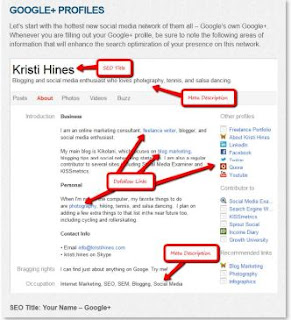
  • guide for optimizing Google+ profile, facebook page, twitter profile...

  • how to get more web traffic

  • Domain name change impact on seach engine ranking...

Google page layout algorithm - page layout (specially above the fold area) have influence on how Google rank page

Recently on January 19 2012 Google make new algorithmic change. This change penalize bloggers who have lot of ads in above the fold area which push content down. I learned about this change from kezanari blog.

I write an article how above fold ads reduce Google search engine rankings. Probably most comprehensive article about this topic you can find in searchengineland article about ads and google penalize.

Excellent article Pages With Too Many Ads “Above The Fold” Now Penalized By Google Page Layout Algorithm


One of adviced tools to test does your site is affected by Google page layout algorithm is Browsersize.

How AdSense unit inside post below title increase ad clicks and how to do it in blogger

To avoid "Google page layout algorithm" I replaced AdSense units from under the post area to in the post area below the title. This change increase my AdSense revenure per visit (CTR - click through rate). To find more how to place AdSense ad unit inisde post below the title and how it affect AdSense revenue read : How to add adsense below post title.

Guide for optimizing Google+ profile, facebook page, twitter profile...

How to Optimize 7 Popular Social Media Profiles for SEO have detailed instruction for optimizing most popular Social Media profile such as G+, Facebook, twitter...

How to Optimize 7 Popular Social Media Profiles for SEO on SEM group


How to get more web traffic

How to get more web traffic is an excellent in depth article with a lot of tips and tricks for increasing web traffic. The writer of this article is Ana Hoffman and she have excellent blog about blogging and making money online. She earn money from her blog, visit her make money report on december 2011 to see how successful is she.

Domain name change impact on search engine ranking

If you thinking about domain name change read article Domain name change and find practical impact of domain name change on authors experience with lots of informations about this topic.


Wednesday, March 7, 2012

How to add AdSense below post title (for blogger)

Recently I add AdSense ad below post title on my blogger blog and result of my action is significant growth in CTR (Click Through Rate). Higher CTR usually leads to higher revenue.

In this article I will try to answer on next questions

  • why bloggers should place adsense ads inside post

  • does AdSense ads directly below title inside Blogger posts are permitted and what to do?

  • How to add AdSense ad below post title in each Blogger post

Why bloggers should add AdSense ad below post?

Answer is simple, AdSense ads placed below post title have higher CTR value. This position is one of best performing for earning money. Check the image of Google heat map for ideal ads placing. Dark orange is for strongest performance to light yellow for weakest performance.

Google heat map for best Adsens placing for better CTR


Since Page layout algorithm change, it is no longer advisable to place large block of AdSense ads above posts. "Page layout algorithm" cause Google penalty for blogs where relevant content is pushed down by large blocks of ads. In this circumstances placing one AdSense below post title right to post content text is a very good solution.

Add AdSense add directly below title and leave a space for content text on the left side


In three weeks after adding AdSense below post my CTR grow from 0.26% to 0.42%. To learn more about CTR trends and AdSense combinations on my blog visit : Increase blog adsense revenue real case scenario.


Does adding AdSense below title in post is allowed?

Using blogger interface you can easily add AdSense ads under post, between the posts or in the sidebar. But to add AdSense ads inside post below post title you should make change directly in blogger template, there is no simple way to do it. Step by step guide how to place AdSense ads below the post title you can find in next section of this article.

The question is does inserting Googe AdSense ads inside post below the title is permitted by Google term of services? Does this method break the rules?

Google forbidden placing misleading labels above Google ad units. So, if the AdSense ad unit directly below post title in some cases it could misleading visitors it is image connected with a title.

It is good practice to add a label above AdSense ad, something like "Sponsored Links" or "Advertisements". With this approach visitor will not be misguided. Take a look at image below how I add a label above the adsense unit below post title.

Add a label under AdSense unit if you put this AdSense ad below post tile and visitors will not be mislead


Personally I started to use this method since 2012-02-12 and AdSense ad unit work properly without a penalty. Here is the link to AdSense page where Ad placement inside article is suggested. Here you can find more about AdSense placement policies.

How to add AdSense ad unit below post title on blogger

Here is short tutorial:

  • First go to your Google AdSense account and copy AdSense unit code you want to implement inside your post

  • go to Postable (or some similar site) paste AdSense code, click button "Make it friendly" and copy encoded AdSense code

  • sign in to your blogger account and go to Layout --> Edit HTML
  • Layout - Edit HTML

  • it is recommended to backup template on your local hard disk before doing any change in edit template box

  • check Expand Widget Templates checkbox

  • now inside Edit Template textbox find:
    <data:post.body/>

  • just above <data:post.body/> tag paste the encoded adsense code

  • click button Save Template and you have AdSense unit just below post title in each post on your blogspot blog

  • if you want to add AdSense ad unit on the right side of your post below post title try with this code (this code should be placed above <data:post.body/> tag):
    <div style='float: right;'>
    
    PUT HERE ENCODED ADSENSE CODE
    
    </div>


Wednesday, February 22, 2012

How Above The Fold Ads Reduce Google Traffic

This article is written for bloggers and website owners who have lost significant number of visitor on the beginning of 2012 year or finding their traffic reduced after adding large block of ads in above the fold area.

On January 19 2012 Google announced change in their algorithm. This change affects the web sites and blogs which have too much ads in the above the fold area. Change is called "page layout algorithm". Google check how much content is placed above the fold area. More content in above the fold area, better.


Why Google check above the fold area

The reason is complaints from users who have difficult to find the actual content and must scrolling down the page. Users want to see content right away, not bellow tons of ads. So Google wants to improve user experience.

Which sites will have traffic reduced?

  • Google "page layout algorithm" does not affect sites which place ads above-the-fold to a normal degree

  • sites where is hard to find actual original content

  • Google traffic will be reduced for sites where relevant content is pushed down by large blocks of ads

  • on sites where only a small amount of visible content located above the fold

  • "page layout algorithm" change affects less than 1% of globally searches

  • be careful with your header, if it is too big it take precious space and push the contend down

Good tool to estimate do you have content in above the fold area is Google Browser Size. This tool help to understand how much of a page’s content is visible to visitors under various screen resolutions. Type URL of your blog, click Go and take a look does you content is visible for specific resolution.

I learn about this topic from kezanari blog and later one more excellent in depth article at search engine land.

This is how my blog look before I make changes to adapt to push up content in above the fold area

Click on image to enlarge:
My blog with AdSense 300x250 Rectangle in above the fold area. Content is under the ad. It is viewed with Google Browser.


My blog traffic was reduced after "page layout algorithm" started. This image above was taken with the help of Google Browser Size.

From the image we can learn:

  • Only 90% of visitors will see content title ("How To Send Money Online") without scrolling down. So 10% of visitors will have scroll down to see title.

  • Only 80% of visitors will see content title and first sentence without scrolling down

  • 70% of visitors will see content title and first two lines without scrolling

After adjustment to avoid Google traffic reduce

Click on image to enlarge:
My blog after contend moved up in Above the fold area


When you enlarge image and look carefully you can conclude that:

  • 99% of visitors will see the title and first two lines of content

  • 98 % of visitors will see the title and fist three lines of content, "sending money online" is last sentence they will see

  • 95% of visitors will see the title and fist six lines of content...

This is example of my blog which will not get Google penalty from "page layout algorithm". But this is my blog after I make changes on layout to move content closest to above the fold area.

Reduced Google traffic on my blog

My blog had significant traffic loss after January 19 2012, around 25% loss in pageviews. Also, I noticed fall of PageRank on some pages on my blog. I believe this reduced traffic is a result of "page layout algorithm".

Click on image to enlarge:
My blog suffered from reduced Google traffic after Google page layout algorithm change in the beginning of 2012


When traffic will be restored

When reduced traffic will be restored and google penalty removed? Unfortunately not immediately!

If you fix a problem (reduce the number of Ads in above the fold area) Google will make note on first re-crawl. But penalty on site will be removed after several weeks.

It can take several weeks for Googlebot to crawl and process enough pages to reflect layout changes on the site

My intention is to follow the traffic and to update this article after traffic will change.

Please do comment and leave your opinion and experience with "page layout algorithm".


Monday, January 23, 2012

What is AdSense CTR, RPM and CPC

After adding AdSense ads on your site you want to find how successful is your AdSense combination placement with a help of performance AdSense reports. To analyze AdSense reports first you should learn what abbreviations like CTR means.


Here we will discuss most important AdSense report indicators like:

  • AdSense CTR (Click Through Rate)

  • AdSense RPM (Revenue Per thousand iMpressions)

  • AdSense CPC (Cost Per Click)


What is AdSense CTR (Click Through Rate)


AdSense CTR (Click Through Rate) is the number of the ad clicks divided by the number of page views.

CTR = (Number of ad clicks * 100) / Number of page views

If my blog have 10,000 pageviews per month and 40 AdSense ad clicks then my CTR is 0,04%.

CTR = (40 * 100) / 10000 = 0,04%


Higher CTR (Click through rate) more AdSense ad clicked means more earnings. So every AdSense publisher want higher CTR.

What is AdSense CTR - Click Through Rate

How to calculate CTR for whole page

When you calculate CTR (Click Through Rate) for whole page or site you should sum up CTR for each individual ad. For example, if my site have two ads, one ad have CTR 0,15% and another ad have 0,25% then my site have total CTR 0,40%.

When you calculate CTR for whole page you could get all ads on your site not only AdSense ads.

What is a good or bad CTR

It is not easy to tell what is good or bad CTR. Click through rate (CTR) depends on specific niche, type of site, design of site and many other factors.

Important is to find your current CTR and keep an eye on CTR during time when you make various action to increase your CTR. Ad placement have great influence on CTR, so try to optimize your ad placement. After you make changes on ad placement keep track how it affect on your CTR. Something similar to my article: Increase blog adsense revenue real case scenario.

To help with AdSense CTR benchmark I will give information what I consider as good or bad CTR:

  • under 0,10% - it is bad CTR, my blog have this CTR before any AdSense ad placement optimization

  • 0,10% - 0,20% - it is acceptable CTR but it can be better

  • 0,20% - 0,30% - it is good CTR

  • above 0,30% - excellent CTR

  • above 2% - by some sources on internet it is suspicious high CTR

Please, leave a comment about CTR on your site and your opinion what is good or bad CTR.


What is AdSense RPM (Revenue Per thousand iMpressions)


Page revenue per thousand impressions (RPM) is calculated by dividing your estimated earnings by the number of page views you received, then multiplying by 1000.


Page RPM = (Estimated earnings / Number of page views) * 1000

This is good indicator to estimate your earning in future, for example if your RPM is €1,12 then you can predict if you will have 15,000 pageviews your earnings will probably be around €16,8 (15 * €1,12).


What is AdSense CPC (Cost Per Click)


The cost-per-click (CPC) is the amount publisher earn each time a user clicks on his ad. In publisher reports, CPC is calculated by dividing the estimated earnings by the number of clicks received.

For example if your CPC is €0.26 then you need around 285 click to earn €100.


Tuesday, January 10, 2012

Make a blog plan for next year

New year 2012 is come. It is time to evaluate how my blog is doing in 2011 and to think about actions for improving blog results in next year. In first part of this article I will show some blog statistics in last year and in second part there will be a list of planning blog activity I intend to do in new year.

How successful was 2011

    To better describe 2011 year there will be shown:

  • number of visits per year

  • AdSense blog earning per year

  • traffic source overview

  • a few words about guest posting

Number of visits per year and next year expectation

In the image below is showed number of visits in 2010 and in 2011 year. There is growth of 79 percent for 2010 to 2011 or 42260 new visits. I am satisfied with this result and hope that on the end of 2012 I will get at least 42260 more visit (in this case sum will be 138.876). Or even better if growth will be 79% in 2012 I would have 172.227 visits.

Blog visits per year


AdSense blog earning per year

AdSense earnings in 2010: 11,49$

AdSense earnings in 2011: 112,61$

My AdSense earning raise much more than traffic. While traffic increased about 2 times, AdSense earning raise 10 times. Why?

Well, one reason is that I optimize my AdSense placement and type. In article Increase blog adsense revenue real case scenario you can find more details about my attempts.


Traffic source overview

My main traffic source is Google 89%, and 10% my blog get from direct traffic. In my opinion it is good to get lot traffic from search engines but I believe that my blog can get much more traffic from referring sites and I intend to work on it this year.

Traffic source overview for my blog


Guest posting

In this year my blog reached PageRank 3 for two months and fall again on PageRank 2. In that period I used myblogguest service and get more than 30 guest posts. Unfortunately those guest article bring me very little traffic. In my opinion those guest posts are not bad but are written without proper keyword research and on page optimization techniques.


Blogging plan for this year


In this year I plan to:

  • get more SEO driven traffic to my blog

  • make a blogging tribe as described in article Increase website traffic - tips from the best

  • improve blog structure - plan to make a few main sections pages which will lead to content pages of some topic (section). Something similar to Javascript effects tutorial. Links to those main section pages will be on main page of my blog

  • improve monetization of my blog - plan to try with buysellads.com service. Unfortunately they do not accept blogspot subdomain so I will think about changing domain name

  • prepare exact instructions for guest posting on my blog and put a visible offer for guest posting on my blog

  • try to buy articles with earned money using a site www.freelancer.com

  • publish some guest posts on A blogs. This is great way to reach audience.


Monday, January 2, 2012

Increase website traffic - tips from the best

How to increase website traffic? Many bloggers ask themselves this question and struggled to find the answer.


A few day ago I bumped on interview with Ana Hoffman on Michael Alexis site. In this interview Ana described her way of generating more and more internet traffic.


After a few minutes of interview I figured out that this interview is very helpful and give some new ways (unknow to me) of generating blogs traffic.

Learn how to increase website traffic from interview with Ana Hoffman


Why Ana Hoffman opinion is relevant?

Recently, I visited Ana blog trafficgenerationcafe for the first time. My first impression was that it is quality blog which stand out. This blog currently have Page Rank 4 which is good, but Alexa rank is around 8500. According to Michael Alexis, Ana started her site 1,5 year ago. In this light Alexa rank at around 8,500 is amazing achievement.

So, I believe that Ana is authority and her interview have real value based on two facts:

  • Ana blog is interesting for reading

  • her blog achieved high Alexa rank in only year and half


How to increase website traffic interview with Ana Hoffman


Original interview length is over one hour and you can find it by following the link on the beginning of this article. Here are interview notes I make and decide to share in this post.

How to pick a niche

  • become authority in a niche, when you one become authority it is much easier to generate new traffic

  • to choose a niche you have to find something that is in demand

  • to succeed you must have passion for business, if you have passion only for niche it is not enough

  • to find topics in demand you need observe and reading other blogs, comments and forums, find what a people want to learn more about

  • pick a niche you have knowledge about, for example if you just start a blog, write about starting a blog not about how to make money with blog because you can't know how to make a money when you even don't have established blog and practically earn nothing

  • start from your experience, it won't go to write about something you don't know about it, people will know that you faking it

  • you must not just a talk about topic but show you know how to do it (like Ana generate traffic on her blog about generating traffic)

  • don't write about topic everybody write, try with different approach from others, put your spin at a topic or different opinion but the most important do something different

How to establish authority

  • there is no secret trick!

  • content is very important, also pay attention how you represent your blog and how you stand out

  • people have come to your blog and say : "Wow, I never read this before, this is amazingly helpful to me, I must come back!"

  • write plainly, write the way you talk

  • don't write fancy, do not put too many words in you post

  • blog content should be simple and helpful

  • you can't do it alone, you need a help of other people

  • find blog that share a niche with you, try with established but not most popular blogs (because it is almost impossible to connect with A blog, they have many various proposals every day)

  • try to form your own tribe (community) with 15 - 20 other blogs

  • try to find a people who are good solid bloggers and a hungry for more attention

  • spread a shares and comments on each other posts, with this method you give a life to your blog plus you learn from each other

  • comment on another posts builds your brand and recognition

How to find and reach member of your tribe

  • identify blogs in your niche

  • start commenting on those blogs

  • it is better chance to be noticed on blogs that doesn't have too much traffic, for example commenting on CopyBlogger or ProBlogger give minor chances to be noticed

  • when you are noticed on this smaller blog send him request for mutually social sharing and commenting

  • pick a blogs who have solid content

  • keep your group small, up to 20, if a group is bigger it is difficult to control

  • you can use facebook group to organize tribe

  • if someone in a group doesn't comment or share he couldn't be member of the group anymore

  • so, if there are 20 members of the group you will get 20 comments and shares per new post

Find traffic sources

  • there are short term traffic (like social media) and long term traffic sources

  • social media is just a way to find people who could be interested in your blog

  • job for you is not to build relationship with them but to introduce and bring them back to your blog

  • find something that works and concentrate on that (Ana is focused on twitter and facebook)

  • stumbleupon have low conversion rate

  • facebook have higher convert rate than twitter

  • choosing right social network depend on niche

  • when you find what work for you stick with that

  • facebook like widget on your blog can be negative social proof if you have small number of facebook followers

A few words about twitter

  • post 4 tweets one after another to make attention, 2 tweets would be links on other blogs, solid posts, 1 tweet a quote because people love quotes, a last one, a tweet to your blog (it will be at the top of tweet stream and chances are that people will click this one first)

  • 25% tweets should be self promotion the rest just useful to other people

  • it is important to provide a lot of value

Conversion

  • pick exactly conversion goal

  • put a call to action in post, for example "thanks on coming, now do this please"

  • it must be only one call for action per post

  • no to popups!!!

  • in middle of quality post add this "if you like to hear more, I talk a more abut that with my subscribers" or lead a visitor to other page which have call to action

Two tips for increasing website traffic

  • think like a regular visitor, if you are a casual visitor will you stay on your blog and read it, would you even scroll down?

  • write a guest post it is best traffic generation strategy


I hope that my interview notes will help you to increase your website traffic. Please, leave comment does tips listed in this article are helpful for your website traffic.


Monday, December 12, 2011

Web page optimization techniques

Web page optimization is a very important thing if you want to have visited web page. How to do it? There are different techniques but in this article we will concentrate on on-page SEO optimization.

On site page optimization

Title tags

The most important HTML tag for Search Engine Optimization. It is very advisable to put your keywords inside title tags. Google search engine crawlers use these title tags as the main source for determining the page topic.

Text inside title tags will be showed in Google search engine result page too. On image below you can see how Google show title in result page for title: "Adding categories to blogspot (blogger) : Useful and interesting web sites". Words from search query are bolded.


Sample for title tag:
<title>Adding categories to blogspot (blogger) : Useful and interesting web sites</title>

Keyword on the beginning of the title have more weight than keywords on the end of the title. Blogspot users can find very good advice in article: Optimize blog - change title.


URL keyword optimization

Keywords in URL have important impact on your Google SERP (Search Engine Result Page) position. To prove this statement let's try type search term "Web page optimization" in Google. First five URL's in Google SERP are:

  • www.websiteoptimization.com/services/analyze/
  • www.websiteoptimization.com/
  • www.google.com/websiteoptimizer
  • en.wikipedia.org/wiki/Search_engine_optimization
  • www.webpagetest.org/

Tips for good optimized URL:

  • URL shouldn't be too long

  • Keywords on the beginning of URL have stronger effect than keywords on the end of URL (for example www.websiteoptimization.com/ is better than www.web-source.net/webpage_optimizing.htm). For

  • use hyphens as keyword separators in URLs. Blogger (Google's blog engine) use hyphens as separator for URL of particular posts.


Keyword position on web page

Keyword position also known as keyword prominence say :

The closer a word is to the front of the text area, the more relevant or important it is.

So put important keywords on the beginning of the page. Good practice is to use paragraphs in your web page. Use <p> and </p> tags to enclose text in paragraphs and put important keyword at start of paragraphs.

Keyword prominence rule is also valid for titles, URL's, headlines...


Keyword density

Keyword density is ratio between number of time keywords appear in page and total number of words on web page. Recommended keyword density is 2% to 8% by some authors, but it vary depending of source. Be careful too high density can trigger a spam penalty from Google. To find a keyword density for specific page check Page Analyzer.


Keyword proximity

Keyword proximity refers to how close the keywords that make up keyphrase are to each other.
To better explain there is an example:

  • A. Web page optimization techniques
  • B. Optimize your web page with best practice techniques

The A keyword phrase will make better Google result ranking for search query like "page optimization" as the relevant words appear next to one another and in the correct order. On the other side keyword phrase B will get better result for "Optimize web page".

Advice is to keep keywords together as a unit. When this is not possible, try to keep keywords not too far away from each other.


Optimization and body elements

Heading tag (<h1></h1>)- typically opinion is to be twice as important in weighting terms as regular body text (source Get to the Top on Google). However recent data from SEOMOZ study has shown that it has a very low correlation with rankings.

Image alt Attribute - it have significant impact on keyword web page optimization. So use keywords in alt attribute to describe images on your web page.

Bold and italic tags - it is good practice to use bold and italic tags on your keywords. By SEOMoz bold tag have a minor amount of SEO weight while italic tag have slightly more SEO weight.


Monday, November 21, 2011

How to: Keyword Research

How to research keywords for your new blog article or web page? For example you decide to publish article and want to find best keywords combination and want to be on top of Google search results. It is not easy! Read this post, use proposed "How to keyword research" method and you will find how to increase probability to find best keywords combination.

How to make keyword research?

Answer on question: "how to make keyword research" is by using KEI and KOI. Let's start with KEI.

Keyword Effectiveness Index (KEI) - helps point out which keywords are the most effective and valuable. The KEI compares the number of monthly searches for a keyword with the number of search results and help to find the most effective keywords.

To find KEI use KEI formula:

KEI = (Number of Monthly Keyword Searches)^2 / (Competing Pages)

Number of Monthly Keyword Searches - this indicator you can find using Google AdWords Keyword Tool.
Competing Pages - find using Google search. Just enter your search term and check number of results.

    To make things more clear take a look at this example:

  • we want to make keyword research on this keyword combination: "google keyword research"

  • on Google AdWords Keyword Tool page we can determine the number of global monthly searches for specific term, for keywords term "google keyword research" it is 9,900 searches per month

    How to keyword research - find out number of monthly searches for specific term with Google AdWords Keyword Tool


  • to find out raw google competition for specific keywords term we use Google search. For "google keyword research" there are 15,200,000 results.

    How to keyword research - find out Google competition for specific keywords term


  • now we can calculate KEI
    KEI = 9,900 ^ 2 / 15,200,000
    KEI = 6,49

  • higher KEI better keywords combination. With KEI we try to find keywords which are highly searched but in the same time are not overused on web

There is one more indicator similar to KEI - Keyword Opportunity Index (KOI). KOI compares the number of monthly searches for a keyword with the number of directly competing search results.

Formula for KOI is:

KOI = (Number of Monthly Keyword Searches)^2 / (Directly Competing Pages)

    Example for calculating KOI for keywords term "google keyword research":

  • monthly searches for keywords term "google keyword research" is 9,900

  • number of directly competing pages can be found by using Google operator "allinanchor:". This Google operator return results containing query terms specified in the anchor text on links to the page.

  • number of directly competing pages for "google keyword research" is 9,740,000.
    Find directly competing pages with Google operator allinanchor for optimized keyword research


  • KOI is:
    KOI = 9,900 ^ 2 / 9,740,000
    KOI = 10,06

When you ask yourself how to do keyword research, it is good practice to find various keywords combination (thesaurus synonyms can help) find KEI and KOI for each of them and compare. Keywords combination with highest KEI or KOI is best choice. KEI method doesn't measure quality of competition just quantity (number of search results). To get quality in calculate, you can use SeoQuake, it show Google Page Rank for each result. So, if first few results have high PageRank, quality of competition is high.


Wednesday, October 19, 2011

Check is blog dofollow or nofollow

How to find does blog have dofollow comments or nofollow comments? This article will teach you how to difference dofllow links from nofollow links.

    In this short guide you will find:
  • what is DoFollow and NoFollow
  • recognize DoFollow in Google Chrome
  • find DoFollow links with Internet Explorer
  • know which link are DoFollow in Firefox
  • easiest and best way to make difference between DoFollow and NoFollow links with NoDoFollow add-on

DoFollow and NoFollow difference

NoFollow

NoFollow is an HTML attribute value used to instruct some search engines (like Google) that a hyperlink should not influence the link target's ranking in the search engine's index. Search engine spiders will NOT crawl NoFollow link.

If link is Nofollow then link will not receive any vote and Google Page ranking will stay the same. To learn more about Pagerank visit Google PageRank simple tutorial.

Example NoFollow link:

<a href="http://interestingwebs.blogspot.com/2011/09/high-pr-dofollow-backlins-blogs-list.html" rel="nofollow">DoFollow blog list</a>

DoFollow

DoFollow links will be crawled by search engines and will get PageRank value (so called Google juice) from site.

Example of DoFollow link:

<a href="http://interestingwebs.blogspot.com/2011/09/high-pr-dofollow-backlins-blogs-list.html" >DoFollow blog list</a>


How to know does link is DoFollow on Google Chrome


  • Find hyperlink on web page

  • Google Chrome - find a hyperlink


  • highligh hyperlink

  • click right mouse button and choose Inspect element

  • Right click mouse on highlighted link and chose Inspect element


  • Inspect element box will be opened in which you will see HTML code of link, if it have rel="nofollow" then it is nofollow link, it doesn't it is DoFollow link
  • Inspect element box with link HTML code


Find if link is DoFollow in IE

  • Press F12 to open IE Developer tools

  • in Developer tools click on "Select element by Click", click on link and look in developer tools HTML code for selected link. If in HTML code exists rel="nofollow" then it is nofollow link, if it doesn't exists it is DoFollow link


Determine DoFollow links in Firefox


  • Find link on web page, highlight link, right click on mouse and choose "View Selection source"
  • Find if link is DoFollow in Firefox by using View Selection Source


  • inspect select source HTML code, if in HTML code exists rel="nofollow" then it is NoFollow link, if it doesn't exists we have DoFollow link

Use NoDoFollow add on for Firefox


Most effective and fastest way to determine DoFollow links is to use NoDoFollow add-on for Firefox.

    NoDoFollow is easy to use:
  • In Menu Bar go on Tool menu and check NoDoFollow menu item

  • Menu bar - Tool - NoDoFollow checkbox


  • Now all DoFollow links are colored blue and NoFollow are colored red

  • DoFollow add-on for Firefox in action

Monday, October 3, 2011

Find DoFollow blog article with high PR

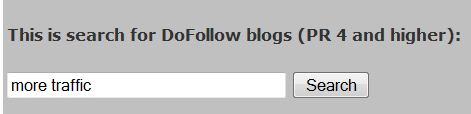
This is search for DoFollow blogs (PR 4 and higher):


This custom Google search make search on over 25 DoFollow blogs in technology niche (blogging, SEO, internet earnings) with high PageRank, PR 4 and higher.

How to use DoFollow finder

Let's say you just write a nice article about methods for increasing number of visitors on blog and want to boost Page Rank of your article. To do that you can go on this page and type some search term connected to written article like "more traffic". When you click Search button you will get a list of result pages. All result pages are from DoFollow blogs with high PR. You can leave comments on result pages and this will have postitive impact on your PageRank.


For those who want to create own custom Google search follow the link.

What is DoFollow blog?

DoFollow link is the opposite of NoFollow - it's a link that can be followed by search engines. DoFollow blog is a blog which have nofollow links in comment section. So when visitors leave comments on DoFollow blog, links to visitors blogs without NoFollow attribute remain in comment section od DoFollow blog. It is important to say that most blogs automatically mark comment links as nofollow, most of blogs are NoFollow. If link is NoFollow there is no PR gain from that link for linked page. Opposite if link is DoFollow (it is not NoFollow) linked page have PR gain from link.


Wednesday, September 28, 2011

High PR DoFollow backlins blogs list

Here is a list of high page rank blogs which have dofollow comments. DoFollow comment means that backlinks to commenter home page on DoFollow blog is not using "nofollow" tag, so part of PageRank juice flow to commenter blog.

Blogs are Pagerank 4 and higher till PageRank 6. All blogs listed on this page belong to Technology niche. When I say Technology niche primarily I think on topics such as : blogging tips, search engine optimization and internet earnings.

In following table with links to DoFolow blogs you will find next columns:

  • Link - url address of Dofollow blog

  • CommentLuv - if CL is written, blog is CommentLuv - When a visitor (commenter) leaves a comment on CommentLuv blog, the CommentLuv plugin automatically searches for commentators latest post. If it finds one, it automatically adds a titled link at the end of the comment which links back to commentators post.

  • DoFollow columns - Comments usually have two backlinks, first on beginning of comment which points to commentators blog main page and another link on the end of comment (on CommentLuv blogs only) which point on last post. In this column you can find information which of those two backlinks are DoFollow.

  • Comment - some basic information about a blog

  • PageRank - information of Google Pagerank of blog

  • Alexa - Alexa rank of blog. Alexa Rank is a measurement about popularity of web site. Alexa is relative because it depends on the data of users who have installed Alexa Toolbar on their browsers. Best Alexa Rank is 1. DoFollow blogs are sorted by Alexa rank from smaller (better) to bigger.


You can search listed DoFollow blogs with PageRank 4 and above by specific keywords, just follow the link.

If you know for DoFollow blog in technology niche with PageRang 4 or higher please leave a link in comment section.


Link Comment
Luv
DoFollow Comment Page Rank Alexa
http://www.grokdotcom.com/ Blog premalink is DoFollow  Marketing optimization blog focused on improving conversion rates, increasing leads, web analytics, SEO, SEM, social media, testing and customer experience. Allows keywords.    6  39271
http://blog.2createawebsite.com/ Blog premalink is DoFollow Blogging, web earnings, traffic 5 5047
http://kikolani.com/  CL Blog premalink is DoFollow Blogging tips, blog marketing, social media 5 15570
http://www.seobythesea.com/ Blog premalink is DoFollow Getting Information about Search and SEO Directly from the Search Engines 5 17378
http://www.outofmygord.com Blog premalink is DoFollow Personal blog, posts on this blog are very long, Blog Notices, branding, Online Evolution, Search marketing, author of this blog is a mart but little boring 5 270720
http://www.sitesketch101.com/ CL Blog premalink is NoFollow, last post is Do Follow SEo, blogging, web design 4 20349
http://basicblogtips.com/ CL Blog premalink is NoFollow, last post is Do Follow Blog tips, blog tutorials for blogger and Wordpress, COmentLuv... 4 21178
http://weblogbetter.com/ CL Blog premalink is DoFollow, last post is Do Follow blogging tips, social media, SEO 4 24199
http://wordpress-websitebuilder.com/ CL Blog premalink is DoFollow, last post is Do Follow Wordpres SEO, basics 4 24500
http://www.stayonsearch.com/ CL Blog premalink is DoFollow, last post is Do Follow Blog marketing 4 27537
http://www.jonathanvolk.com/ CL Blog premalink is DoFollow, last post is Do Follow Making money online 4 29108
http://www.jonathanvolk.com/ Blog premalink is DoFollow internet earning, affiliates 4 29140
http://kaiserthesage.com/ CL Blog premalink is DoFollow, last post is Do Follow 4 33620
http://www.attractionmarketingonline.com CL Blog premalink is DoFollow, last post is nofollow Attraction Marketing, blogging,social media 4 34099
http://wassupblog.com/  CL Blog premalink is DoFollow, last post is Do Follow Blogging tips, making money 4 46302
http://freebloghelp.com/ CL Blog premalink is DoFollow, last post is Do Follow SEO, blogging, Google, Leveraging tools 4 75695
http://jamesmartell.com/ Blog premalink is NoFollow, last post is Do Follow affiliate marketing train site 4 79615
http://www.techtricksworld.com/ Blog premalink is DoFollow Techology blog, facabook, google, blogging, reviews, WordPress 4 81361
http://www.authopublisher.com/ CL Blog premalink is DoFollow, last post is Do Follow Author is preacher and blogger. Write about blogging, publishing, writing tips. 4 85038
http://www.memwg.com/ Blog premalink is DoFollow unofficial AdSense blog 4 86439
http://blondish.net/ Blog premalink is DoFollow Social media, blogging, tutorials 4 89458
http://www.dazzlindonna.com/blog/ CL Blog premalink is DoFollow, last post nofollow Author is a woman who is live from internet earnings. Blogging, earnings, marketing. 4 98880
http://bloggingwithoutablog.com/ Blog premalink is DoFollow, you can put a dofollow link in a comment Grandmother who like to write things down in her notebook and started to blogging 4 128062
http://www.windowstalk.org/ CL Blog premalink is DoFollow, last post is Do Follow, with some javascript in links,  Technology, Windows, Blogging, Software 4 137223
http://www.doitwithwp.com/ CL Blog premalink is DoFollow, last post is Do Follow WordPress, this guy really love to write about Wordpress. WordPress Tutorials 4 138116
http://www.ezaroorat.com/ Blog premalink is DoFollow  SEO, web designing and internet marketing.. 4 183055

Thursday, August 4, 2011

Find more followers for Google plus circle

How to increase number of your followers on Google plus one network?. More followers more social power, new social network appeared: Google plus one (some call it just "g+"). And battle for followers is started. This article will discuss about few methods to extend your google circles. How to convince people to step in your google circle?

Make your profile noticable

Profile picture

Ask yourself what possible G+ follower first see when he come in touch with your Google plus profile?

First thing G+ member will see is your Google profile photo. So, you must find a photo that will grab G+ user attention. Someone once said that one picture is more powerful than thousand words, let's see example.

Profile images of Google plus users


Take a quick look on picture above and say who is most popular. In my opinion most of the people will first notice picture of Seth Godin. And yes, he is very popular and have most followers (not just on Google plus network). One of reasons of his popularity is his appearance, he is standing out. Standing put is a key of success on various social networks.

Conclusion is to choose profile picture wisely.

Posts

Posts are very important when someone make decision does he will follow your Google plus profile. If your posts cover Google plus member interests then you have good chance to get one more Google plus follower. Try to make smart and (or) funny posts and follower will come one by one.

When you have some really good post use extended circles. Extended cicrcles mean that you will share your post with everyone in your circles plus all the people in their circles (only first level).

About section and subtitle bar

Fill About section. There people watch when they want to learn some basic information about you. For example I always take a look at Introduction line under About section.

Under your user name there is one subtitle line where you can write short line of text. My advice is to use it.

Google plus - name in title, short line in subtitle and profile photo on left


Follow people with many followers

This is a rule for any social network. If you follow some person bigger chance is that this person will follow you. If that person is influential you will get more followers. Very simple, in language of numbers it is better to have follower who have 10000 followers than follower who have 15 followers.

To find Google plus influential people like celebrities and hottest Google plus posts in last 24 hours visit: Google + Statistics.

Invite people you already know

Google plus offer you to get in circles people who are in your gmail contacts. Also, under Find people there are options for invite Yahoo contacts, Hotmail contacts and option for upload address book. So, you can add all your contacts (or maybe not all) in Google circles and hope they will add you to their circles.

You can try to establish connection with your connections in other Social networks (like Twitter, Digg...) but you must find them by their gmail address or their name.


Add Google plus profile button

If you have web site or blog you can add Google plus profile button on your site. In case your site or blog have good traffic there are good chance to get some more Google plus follower.

This is how G+ profile button look like:

Guide to add Google plus profile button

  • Go to Google profile button page

  • enter your Google plus profile URL - you can find your profile URL in URL bar when your Google profile page is opened

  • Chose Google profile button size

  • Copy Google + button code and paste it on your site or blog


Try to find new Google plus followers using various groups

With time there will be various places on web where you could take an opportunity to get more Google plus followers like forums, facebook pages, internet sites, social networks...

For example take a look at this facebook page: Google Plus Add List - Get More Followers and Bigger Circles.


Monday, August 1, 2011

Add Google Plus One Button to Blogspot (blogger)

This is short step by step guide how to add Google +1(plus one) share social button to every blogger post. To implement Google plus one button on blogger you need to copy Google code for button and paste copied code inside HTML Layout section in blogger interface.

This is how Google Plus one social link looks like:

To add Google plus one button to blogspot (blogger) first copy this Google plus one code:

<!-- Google  1 button Start -->
<b:if cond='data:blog.pageType != &quot;static_page&quot;'>
<p></p>
<div style='float:left;padding:10px;'>
<script type="text/javascript" src="https://apis.google.com/js/plusone.js"></script>
<g:plusone expr:href="data:post.url" size="standard" count="true"></g:plusone>
</div>
</b:if>
<!-- Google  1 button End -->

You can replace value of attribute size (on example is standard) with one listed of values depending on appearance you want to get:

Button size (with count) Value
google plus one small  small
google plus one medium  medium
google plus one standard  standard
google plus one tall  tall

To add Google +1 (plus one) button on the beginning of every post or on the bottom of every post follow this steps. In HTML layout search for <data:post.body/> and paste the code just before if you want to have Google +1 button on the top of the post or after it for Google plus one button on the bottom of the post.

Here are steps:

  • Go to Layout in your blogspot blog

  • Click on Layout --> Edit HTML

  • it is recommended to backup template on local hard disk before doing any change in edit template box

  • check on Expand Widget Template checkbox

  • find <data:post.body/>

  • for Google +1 button counter on the top of post add Google plus one button code (for code check previous section of this article) before <data:post.body/>

    ...

    [GOOGLE +1 BUTTON CODE]
    <data:post.body/>
    ...

  • or you can want Google plus one button on the end of your posts, add Retweet button code just after the <data:post.body/>

    ...
    <data:post.body/>
    [GOOGLE +1 BUTTON CODE]
    ...


There is one problem. On my blog main page when more than one post appear, google plus one button is showed only on first post. When one post per page is showed everything is OK. I didn't find solution for this problem on the web. On the other side this problem is not so serious.


Thursday, June 9, 2011

What Is Direct Email Marketing?

Direct Email marketing is when a company sends a profitable message to a group of people by the use of electronic email. The emails generally consist of advertisements, business requests or donation and sales solicitation. It is considered email marketing if it helps to build a company’s reputation, trust in a product and/or customer loyalty. A direct email marketing solution is believed to be an excellent and resourceful way of keeping in constant contact with clients and potential business associates while promoting your business at the same time.

Internet marketing - Image by renjith krishnan / FreeDigitalPhotos.net

An online marketing company can help businesses greatly benefit from this sort of advertising as it is enables you to reach out to your target audience without a huge amount of expense. Television advertisements, radio air play and leaflet drops are time-consuming and costly, not only that, there is the issue of not reaching a wide enough audience. A direct email marketing solution is worldwide and free. You can also tailor your email lists to meet several criteria’s such as customer’s likes and dislikes, spending habits and how long certain addresses have been on the list. Emails are created and sent out to specific members of your email list personalised to provide the information they have requested or are interested in. This not only increases your sales but also makes your customers value you.

There are a few different ways of developing an email marketing campaign. An online marketing company would advise you to start off by sending a welcome email to thank the new client for expressing interest in your company. Welcome letters notify the public about the company and help to give you information about the customer so that they can be put into the correct categories for the specific information they need.

Other email campaigns can include special announcements on products or services, a monthly newsletter concerning your company and/or products, money off coupons for future purchases etc. each email you send out needs to have company information towards the bottom of the page, enabling potential clients to learn more about your company and to ‘opt-in’ to receiving any upcoming emails. An online marketing company may advise you to offer your clients an incentive program by giving out a ‘promo’ code so that they can collect discounts on future purchases. This is a simple way of monitoring the worth of your campaign as well as what your contacts are interested in.

With the additional help of marketing software, a direct email marketing solution is a fantastic way of reaching your target markets but also staying connected to your purchasing base. When used efficiently, this form of marketing can keep hold of older clients and get new ones as satisfied customers will recommend your services to their friends and family and it could not be simpler, with the touch of a button you can forward an email. Your profit on investment is substantially higher than with the more traditional ways of marketing. With the help of an online marketing company to ensure these methods of advertising are correctly employed, your company will go from strength to strength.

This post was written by Crispin Jones on behalf of Boom Online Marketing. Crispin writes on marketing subjects including direct email marketing.